Read Me First
Working with Delivery Notes.
Starting on v2.0 of myDATA, the life cycle of a Delivery Note will be
monitored, from the time the transition is started to the time the delivery is
completed.
The image below illustrates the complete workflow of a delivery note.
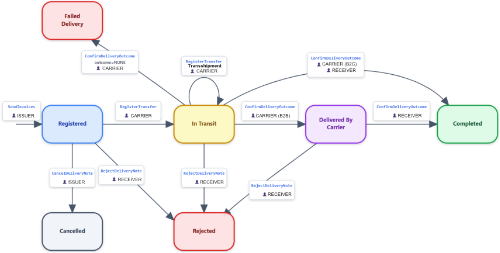
- The Issuer issues the Delivery Note [SendInvoices Class]
-
The carrier (or the issuer itself) initiates the delivery. [DeliveryNote Class - Method RegisterTransfer]
If the packages of the delivery are going to be transshipped, the new carrier declares this transshipment. [DeliveryNote Class - Method RegisterTransfer]
-
When the carrier (or the issuer itself) delivers the package, the carrier finishes the delivery. [DeliveryNote Class - Method ConfirmDeliveryOutcome]:
a. IF the transaction is B2C, then no further action is required. The delivery is considered "completed."
b. IF the transaction is B2B, then the receiver must verify that the delivery is indeed finished, and only then is it considered "completed." [DeliveryNote Class - Method ConfirmDeliveryOutcome] Within and during all these steps, the Delivery Note can be rejected/canceled.
The documents for which the above procedure must be followed are the following:
- Invoice 1.1 (Sales Invoice) if it includes the Delivery Note indicator (isDeliveryNote=True)
- Invoice 5.1/5.2 (Credit Invoice) if it includes the Delivery Note indicator (isDeliveryNote=True)
- Invoice 11.1 (Retail Sales Receipt) if it includes the Delivery Note indicator (isDeliveryNote=True)
- Invoice 11.4 (Retail Sales Credit Note) if it includes the Delivery Note indicator (isDeliveryNote=True)
- Invoice 9.1 (Linked Delivery Note)
- Invoice 9.2 (Summary Delivery Note)
- Invoice 9.3 (Delivery Note)
- Invoice 10.1 (Linked Quantitative Receipt Note)
- Invoice 10.2 (Unlinked Quantitative Receipt Note)